Sunday, September 11, 2016

Board Game Lab Session

Smash Up Session Report

When first being coming to class I was unsure of what I was going to play, but right away Smash Up caught my eye!(Image Below) Everything on this cover was interesting to me, and I had to know more about it.
Cover to Smash Up
Links to Smash Up on BoardGameGeek:
Smash Up mechanics:
Smash Up starts with each player choosing two different themed decks, and then they mix the two decks together to get a nice mixture of the two themes. There are a deck of base cards to be drawn from and placed on the table, the number of base cards in play should be 1 more than how many players there are(Ex. 4 players = 5 bases cards). Each turn, players get to put down a action card and minion card from their hand, and then draw 2 more cards from their deck. The objective is to capture bases by placing enough minions on them, to get points. First player to get the set amount of points wins the game.
My Smash Up Session Report:
The rules of this game are fairly complex to understand when you first jump in, even with a veteran player in our playing group to guide us it was a bit hard to grasp. Some of the rules/aspects of the game seemed unclear, and most of this confusion was from the action cards or player effects, where the wording would make it difficult to understand what was supposed to be done.
We started the game with 4 players, so that meant that we had 5 base cards in play. Starting bases included alien, zombie, ninja, and fairy bases, all having different effects that would either effect the game once the base was taken over or every time a card was played on it. My deck was the destructive and stealthy combo of Ninjas and Robots, ninjas have a tendency to be sneaky and robots come in the masses. The other players and their respective decks were Kurt with Zombie/Bears (Zombies come back from the dead and bears are just badass), Stacey with Fairy/Wizards (Fairies are well fairy-like and wizards get to use many actions), and Eddie the veteran with Alien/Pirates (Aliens are known to abduct others and pirates like to steal). Our game was to 10 points.
The game started with Eddie, who proceeded to play a minion who automatically gained him a point, then moved on to Stacey's turn who nervously played her first cards unknowing of what was going on or how to really play, just like Kurt and I stumbled through our first turns. After getting the idea of the game down a little more, it was very fast paced and players seemed on edge throughout the turns, unknowing of what will happen. Unfortunately for my group, our veteran player was helping the class and had to leave for about half the game, leaving some room for the noobs to flex their new skills. 
The bases started to slowly be taken over as the game went on, and luckily for me the robots and ninjas were prevailing on the map. Although the bear/zombies put up a good fight, the aliens were afcg(Away from Card Game) almost half the time and fairy/wizards could not get enough minion cards down to overtake a base. As base upon base was strategically sieged by my Ninja/Robot armies, the points stacked in my favor, till finally the last base "The central Brain" was won by me and the game was mine!

Last Base Card Won
Overall I really did like the game and feel it is best played with more than two people probably. (I haven't played it with less than 3) This game can take some time, our game was about 30-45 mins long, but if you set the winning amount of point to less than it could end faster.
If you liked my Session report, her is another Smash Up Session Report from BoardGameGeek.
Hope you enjoyed this Session report, and please go try out Smash Up for yourself!

Sunday, August 28, 2016

Session Report Arcade Game Ludology

Day at the Internet Arcade
Video Game Emulation
I am moderately familiar with emulators, since I've always loved to be able to play games that I don't have the console or disk/cartridge for. (OR THE ONES MY MOTHER GAVE AWAY WITHOUT ASKING!) Ive used the emulators for NES, gameboy, nintendo DS, N64, Sega genesis, Sega dreamcast, gamecube, xbox, and more to be able to play the games of my childhood or even those I missed out on. One of the Emulators I've been playing more often recently is the gamecube emulator Dolphin to play Super Smash Bros Melee, which in the emulator and game tournament world has been a huge deal. The perks of this emulator are that the graphics can be switched to 1080p and the game can modded for tournament mode, which has specifics gameplay rules and maps. When I first got into emulators I got the project64 Nintendo 64 emulator, so that I could replay through the Legend of Zelda: Ocarina of Time (One of my favorite games of all time). I was able to fully complete the game on my old pc laptop, although it would have been much easier on an actual Nintendo 64.

I can't deny that playing some games on the original consoles they are made for is not at all like the emulator, but sometimes it can be almost impossible find the original consoles and games for everything you'd ever want to play. Emulators are a blast to play through for they have advantages over some original systems, even though they can have their downfalls as well...

Pros and Cons of Game Emulation

Pros:

  • Usually can be played on any Microsoft OS Computer (Some emulators are not compatible with Mac OS)
  • Can be played on mobile devices, tablets and computers
  • Can run better than original hardware depending on what computer emulator is run on and how intensive the game/console emulation   
  • Games can be modded to have better gameplay, graphics, and extra features/content
  • You can play a variety of gaming systems and games without having to physically have them
  • Like in the case of archive.org, Emulators can be used to help keep older games and systems around even when the hardware is lost or destroyed

Cons:

  • Some emulators aren't compatible with all computer operating systems
  • Controls can be quite difficult to use/get used to, and sometimes even impossible for certain systems or games without an actual controller to use on the computer rather than a keyboard
  • Can run worse than original depending on what computer the emulator is run on and how intensive the game/console emulation is
  • Doesn't feel the same as playing on the original system sometimes.
  • In most cases the original hardware for console games will not lag during gameplay, where as on a computer emulating a gaming console can lag from using a choppy emulator or having other processing going in the background of the OS.
  • Games/Consoles can be too expensive or hard to find

Session Report Arcade Game Ludology

When it comes to making a decision most the time I am indecisive, and when it came down to adopting a game to play on the internet arcade archive I had to play around with a few games before finding something that really peaked my interest.

Kyros:
This was the first game that I decided to dive into, and it was a pretty simple straightforward game. In the game you play as a badass blonde guy with cool shades on, who is being swarmed by infinite enemies the entire game.

Basically you just jump around avoiding enemies or punching them off the screen with your super punch until you get to the end. Sometimes an item will appear which you get to use for some time, but besides this the game is pretty barren and gets boring after a short time.

After messing with some other old school emulation games, I decided to play around with the MS-DOS games, and here I found...

Girlfriend Construction Set:
Now this was an interesting game, if you could call it a game even. So the objective of this game was to make a girlfriend or find one or something of that order, but it was put together so badly that it is hard to tell.

Opening graphic of game

The game starts with you choosing a name for yourself and then for the girl you want to date. After setting up the girls various stats, such as her attitude, personality, and body size, the player gets to choose various dates to ask the girl to go on. After setting up a date the player must choose what to do throughout the dates such as actions and things to say, but they are all predetermined and sometimes counterintuitive.
Overall a terrible game to play.

Very limited options for what to do
Gauntlet:
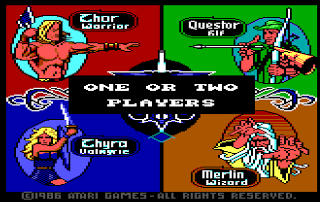
When I saw gauntlet appear on the list I was so excited to play the old school hack n slash that I've played newer versions of, but sadly the game doesn't work on archive.org and crashes after the player chooses a character.

Crashes after this point on archive.org

Demon Gate - 666 New Levels for Doom and Doom II:

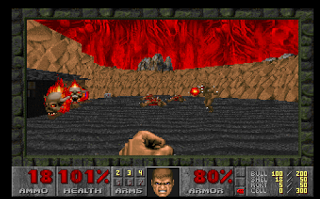
Doom is where I found happiness in the archive. This classic First person shooter is still a blast to play to this day, and it involves the player being a lone gunman that travels through pixelated 2-D maps trying to kill everything in your path in hopes of finding health, weapons, ammo armor, and an exit.

Intro Graphic Screen to the game

When I started, I went for the middle difficulty and just went in for it. This didn't leave me standing long, for I couldn't figure out how to shoot for the first 30 seconds of my character being mobbed by zombies, and after going through a few rooms I got shot down. Starting off it was a bit confusing to get the controls down, but once I did a little online research I figured out how to properly control my character and annihilate some demons.

Start the game on a ledge staring at two zombies.

When in hell, destroy everything before it destroys you.

One of the cools parts of Doom, is that the creators threw in a bunch of easter eggs and secrets for the players to find, like the chainsaw that you can get right at the beginning of the first map by walking backwards. Finding this chainsaw gave me an issue as well as a hack/glitch for the game, for at first I was having issues using the chainsaw until I realized how I could use it to my advantage. To use weapons in Doom the player must press the control key, and to use the chainsaw you have to hold down this key. On a Mac (which I was using at the time) holding down control and pressing an arrow key is a mac OS shortcut that lets the user see all their open desktops, and this is not what I want to have happen while i'm trying to use a chainsaw to cut demons in half. The shortcut suspended the browser window that my game was in, stopping me from moving, but the chainsaw stayed running. When I clicked back into my window, the chainsaw was still going without me holding control and I could run around using it on everything in sight. This was fun for a while, because the chainsaw had infinite ammo/energy and could go forever but ended up not being so helpful with ranged enemies.

Our Main character's grin when finding the chainsaw is perfect.

After chainsawing for a while, I tried playing the game with some more strategy and it did not disappoint. Making it through the first level was easy, but then finding all the secrets of the map is another story. Without a proper internet guide, finding all of the secrets in this game would be no walk in the park.  

Conclusion
Overall, I'd say emulators are awesome and a great tool for saving video game history for future generations to enjoy.